ThinkSystem SR650/a V4 Riser Cage for Riser 2 or 3 w/ 3x PCIe Slots installation
In diesem Dokument finden Sie wichtige Informationen zum ThinkSystem SR650/a V4 Riser Cage for Riser 2 or 3 w/ 3x PCIe Slots installation.
Der Zusatzeinrichtungssatz wird mit der folgenden Komponente geliefert.
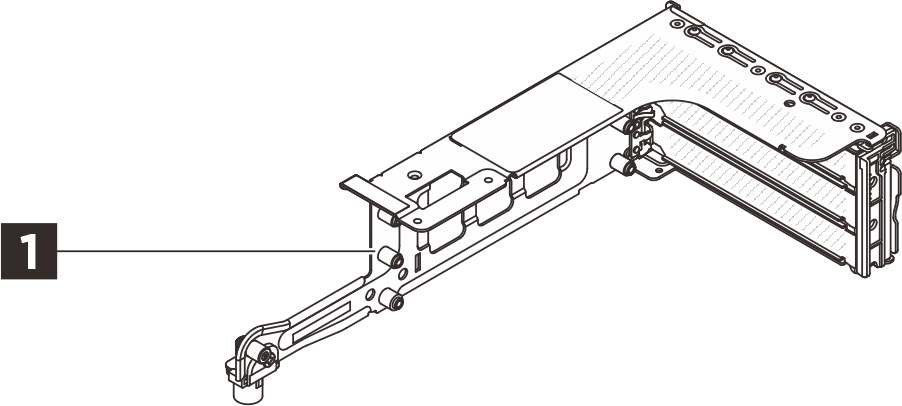
1 Ein 3FH-Adapterrahmen
HINWEIS
- Die Abbildung in diesem Dokument weicht möglicherweise geringfügig von Ihrer Hardware ab.
Installation von Zusatzeinrichtungen
- Informationen zum Installieren der Zusatzeinrichtung finden Sie im entsprechenden Benutzerhandbuch:
| Servermodell | Hardwareinstallation |
|---|---|
| SR650 V4 | Hintere Adapterkartenbaugruppe und PCIe-Adapter austauschen |
| SR650a V4 | Hintere Adapterkartenbaugruppe und PCIe-Adapter austauschen |
- Aktuelle technische Informationen, einschließlich Firmware‑ und Treiberdownloads, finden Sie auf der Website des Lenovo Support für Rechenzentrum.

| Option installation | |
|---|---|
| To install the option, refer to “Hardware replacement procedures” in the server User Guide, which is available at Lenovo Docs https://pubs.lenovo.com. | |
| For the latest technical information including firmware and driver downloads, go to Lenovo Data Center Support website https://datacentersupport.lenovo.com. | |
First Edition (May 2021)
© Copyright Lenovo 2021.
LIMITED AND RESTRICTED RIGHTS NOTICE: If data or software is delivered pursuant to a General Services Administration (GSA) contract, use, reproduction, or disclosure is subject to restrictions set forth in Contract No. GS-35F-05925
Feedback geben