ThinkSystem SR650/a V4 Riser Cage for Riser 2 or 3 w/ 3x PCIe Slots installation
Consulte este documento para obtener información sobre el ThinkSystem SR650/a V4 Riser Cage for Riser 2 or 3 w/ 3x PCIe Slots installation.
El kit de opciones incluye los siguientes componentes.
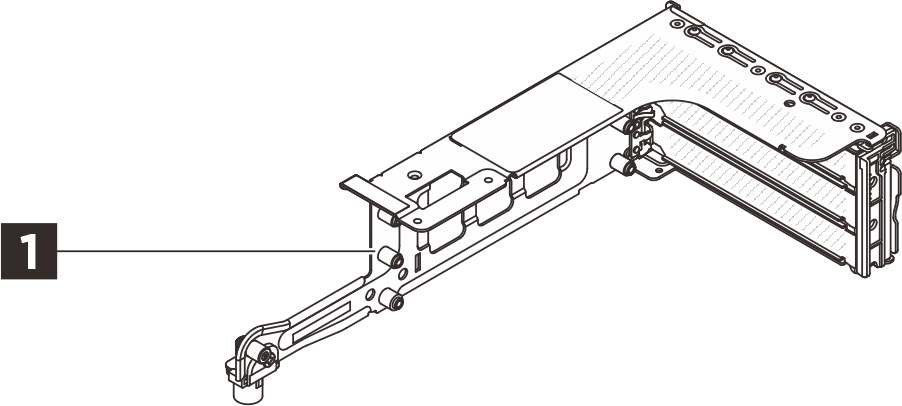
1 Un compartimiento de expansión 3FH
NOTA
- Es posible que la ilustración de este documento difiera ligeramente de su hardware.
Instalación de opciones
- Para instalar la opción, consulte la guía del usuario aplicable:
| Modelo de servidor | Instalación del hardware |
|---|---|
| SR650 V4 | Sustitución del conjunto de expansión posterior y el adaptador PCIe |
| SR650a V4 | Sustitución del conjunto de expansión posterior y el adaptador PCIe |
- Para obtener la información técnica más reciente, incluida la descarga de firmware y controladores, vaya a Soporte del Centro de Datos de Lenovo.

| Option installation | |
|---|---|
| To install the option, refer to “Hardware replacement procedures” in the server User Guide, which is available at Lenovo Docs https://pubs.lenovo.com. | |
| For the latest technical information including firmware and driver downloads, go to Lenovo Data Center Support website https://datacentersupport.lenovo.com. | |
First Edition (May 2021)
© Copyright Lenovo 2021.
LIMITED AND RESTRICTED RIGHTS NOTICE: If data or software is delivered pursuant to a General Services Administration (GSA) contract, use, reproduction, or disclosure is subject to restrictions set forth in Contract No. GS-35F-05925
Entregar comentarios