ThinkSystem SR645 6 x SAS/SATA 4 x AnyBay 2.5" Backplane SAS/SATA cable kit
옵션 패키지는 다음 항목을 포함합니다.
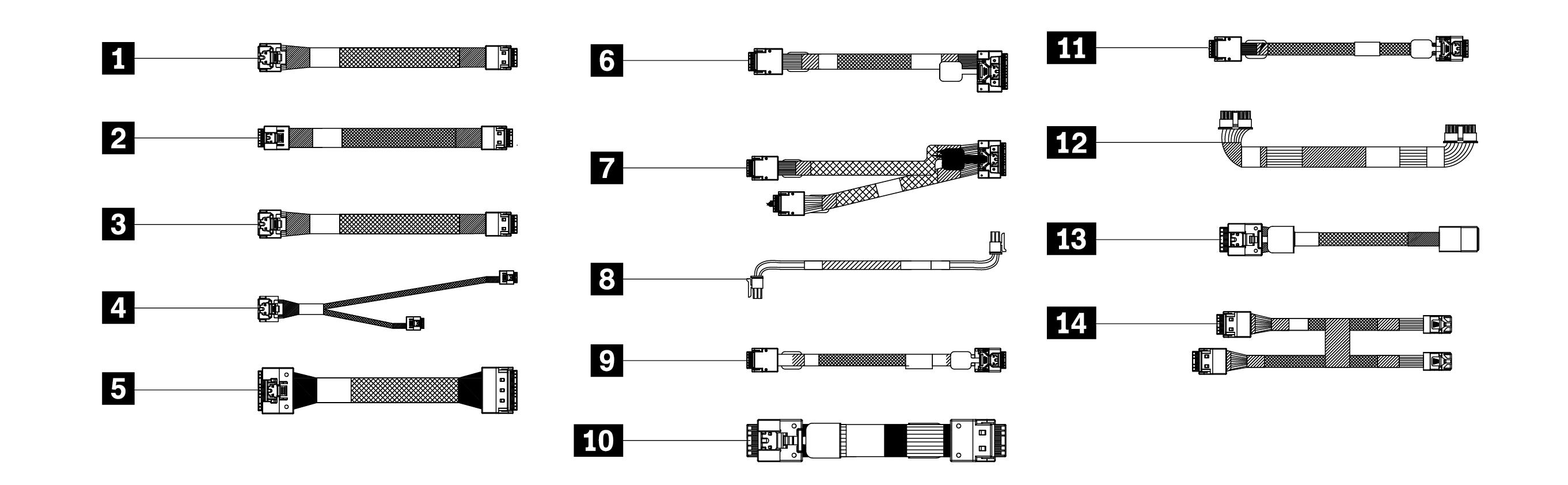
1 온보드 SATA 케이블, PCIe2(MB)에서 SAS0(BP)
2 온보드 SATA 케이블, PCIe4(MB)에서 SAS1(BP)
3 온보드 SATA 케이블, PCIe5(MB)에서 SAS2(BP)
4 온보드 SATA 케이블, PCIe5(MB)에서 뒷면 및 SAS2(BP)
5 온보드 SATA 케이블, PCIe8(MB)에서 CFF 입력
6 SFF G4 케이블, C1(SFF)에서 SAS2(BP)
7 SFF G4 케이블, C0(SFF)에서 SAS0(BP) 및 SAS1(BP)
8 CFF 전원, RAID 전원에서 전원(CFF)
9 CFF G4 케이블, C0(CFF)에서 SAS0(BP)
10 CFF G4 케이블, C1(CFF)에서 SAS1(BP)
11 CFF G4 케이블, C2(CFF)에서 SAS2(BP)
12 전원 케이블, BP 전원에서 전원(BP)
13 SFF G3 케이블, C0/C2(SFF)에서 SAS/SAS2(BP)
14 SFF G3 케이블, C0 및 C1(SFF)에서 SAS0 및 SAS1(BP)
CFF: 팬과 앞면 백플레인 사이의 사용자 지정 폼 팩터 RAID 어댑터
MB: 마더보드
Rear: 뒷면 드라이브 백플레인
SFF: 뒷면 PCIe 라이저 슬롯에 설치된 RAID 어댑터
주의
특정 구성에서는 일부 케이블이 사용되지 않을 수 있습니다.
옵션 제품 설치에 대한 정보를 보려면 _설치 안내서_의 내장 케이블 배선 장을 참조하거나 https://pubs.lenovo.com/sr645/internal_cable_routing로 이동하십시오
최신 기술 정보를 보고 장치 드라이버 및 업데이트를 다운로드하려면 https://datacentersupport.lenovo.com/us/en/products/servers/thinksystem/sr645/7d2x/downloads/driver-list로 이동하십시오

| Option installation | |
|---|---|
| To install the option, refer to “Hardware replacement procedures” and “Internal cable routing” in the server User Guide, which is available at Lenovo Docs https://pubs.lenovo.com. | |
| For the latest technical information including firmware and driver downloads, go to Lenovo Data Center Support website https://datacentersupport.lenovo.com. | |
Second Edition (October 2022)
© Copyright Lenovo 2022.
LIMITED AND RESTRICTED RIGHTS NOTICE: If data or software is delivered pursuant to a General Services Administration (GSA) contract, use, reproduction, or disclosure is subject to restrictions set forth in Contract No. GS-35F-05925
피드백 보내기