ThinkSystem SR665 3.5" Chassis Front Backplane AnyBay cable kit
选件包内包含以下物品。
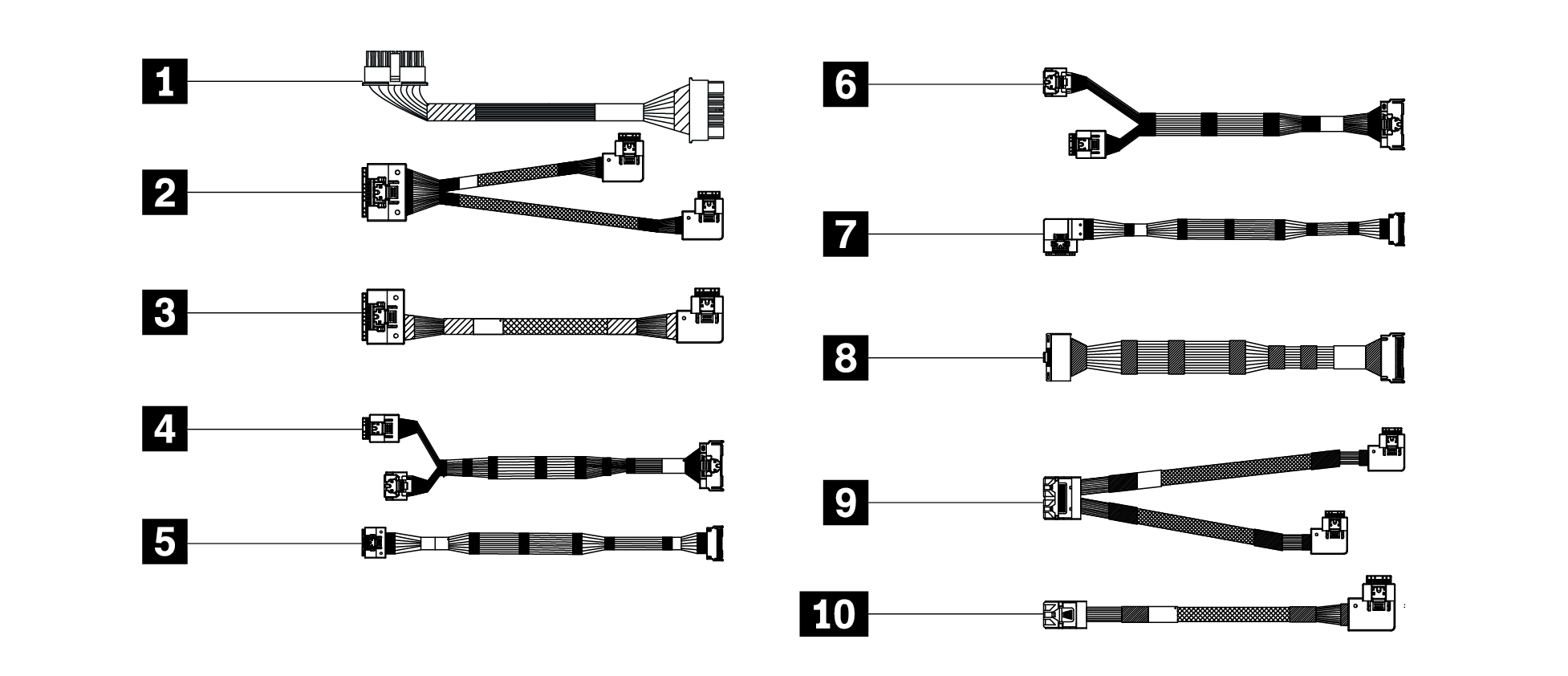
1 主板转正面 3.5 英寸背板电源线(数量:2),从 PWR 1/2(主板)到 PWR 1/2(背板)
2 G4 RAID 转正面 SAS/SATA 背板,从 C0(RAID)到 SAS0(背板)和 SAS1(背板)
3 G4 RAID 转正面 SAS/SATA 背板,从 C0(RAID)到 SAS2(背板)
4 板载转正面 12 x 3.5 英寸 AnyBay,从 PCIe1(主板)和 PCIe2(主板)到 NVMe0–1(背板)
5 板载转正面 12 x 3.5 英寸 AnyBay(数量:2),从 PCIe3/8(主板)和 PCIe7/8(主板)到 NVMe2–3/10–11(背板)和 NVMe2–3/4–5(背板)
6 板载转正面 12 x 3.5 英寸 AnyBay,从 PCIe4(主板)和 PCIe5(主板)到 NVMe4–5(背板)
7 板载转正面 12 x 3.5 英寸 AnyBay,从 PCIe6(主板)到 NVMe6–7(背板)
8 板载转正面 12 x 3.5 英寸 AnyBay,从 PCIe7(主板)到 NVMe8–9(背板)
9 G3 RAID 转正面 SAS/SATA 背板,从 C0(RAID)和 C1(RAID)到 SAS0(背板)和 SAS1(背板)
10 G3 RAID 转正面 SAS/SATA 背板,从 C2(RAID)到 SAS2(背板)
注
部分线缆可能无法在特定配置中使用。
有关安装该选件产品的信息,请参阅《设置指南》中的 “内部线缆布放” 章节,或访问:https://pubs.lenovo.com/sr665/internal_cable_routing
要获取最新的技术信息并下载设备驱动程序和更新,请访问:https://datacentersupport.lenovo.com/us/en/products/servers/thinksystem/sr665/7d2w/downloads/driver-list

| Option installation | |
|---|---|
| To install the option, refer to “Hardware replacement procedures” and “Internal cable routing” in the server User Guide, which is available at Lenovo Docs https://pubs.lenovo.com. | |
| For the latest technical information including firmware and driver downloads, go to Lenovo Data Center Support website https://datacentersupport.lenovo.com. | |
Second Edition (October 2022)
© Copyright Lenovo 2022.
LIMITED AND RESTRICTED RIGHTS NOTICE: If data or software is delivered pursuant to a General Services Administration (GSA) contract, use, reproduction, or disclosure is subject to restrictions set forth in Contract No. GS-35F-05925
提供反馈